CRM Automation & Customer Journeys
Attriqs CRM automates your routine work with a visual workflow engine: each workflow is a trigger, then conditions, then actions, so lead routing, follow-ups, stage changes, field updates, task creation, and notifications run on their own. Multi-step journeys nurture leads step by step, forms capture leads straight into the CRM with source attribution, and MosAIc can build a workflow from a plain-language description. You stay in control, with a chance to review before anything sends.
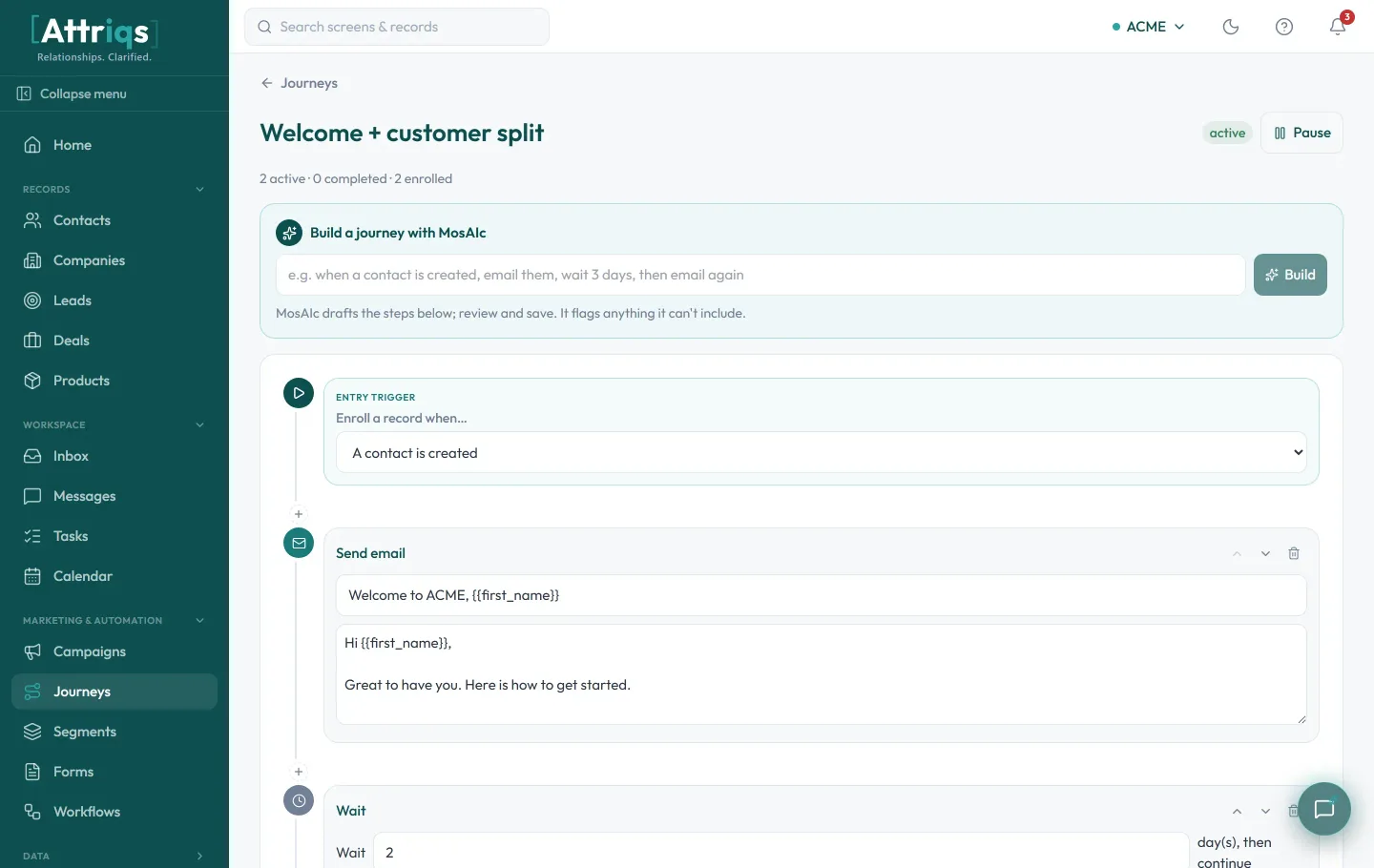
Build a journey on a canvas, or just describe it to MosAIc
Lay out a workflow visually as a trigger, then conditions, then actions, and see the whole flow before you switch it on. Would rather skip the canvas? Tell MosAIc what you want in plain language and it drafts the steps for you to review and adjust, so you never start from a blank page.
- Drag-and-drop canvas: a trigger, then conditions, then the actions that run
- See the full flow at a glance before anything goes live
- Describe a journey to MosAIc in plain language and it drafts trigger, email, and wait steps
- Review and tweak MosAIc's draft, then turn it on, no code required
Put your routine follow-up and busywork on autopilot
Workflows fire on real events like a new lead, a stage change, a reply, or a deal going quiet, then do the work for you. Chain several together to turn a process that depends on memory into one that runs the same way every time.
Capture leads with forms, and stay in control
A built-in form builder turns your website into a lead source: every submission lands in the CRM with its source captured, ready for a workflow to take over. And automation never gets ahead of you, you review before anything sends.
Want the playbook on the concept itself? Read our guide to CRM automation.
Frequently asked questions
How do workflows work in Attriqs CRM?
Each workflow is a trigger, then conditions, then actions, built on a visual drag-and-drop canvas. The trigger is a real event like a new lead or a stage change, the conditions narrow it to the records you mean, and the actions run automatically: send an email or text, create a task, update a field, move a stage, notify a teammate, or enroll a contact in a journey.
What is the difference between a journey and a workflow in Attriqs CRM?
A workflow is a single rule that fires on one trigger, like routing a new lead or reminding an owner when a deal goes quiet. A journey is a multi-step sequence that walks a contact through timed touches over days or weeks. Both are built on the same visual engine, and a workflow can enroll a contact into a journey.
Do I need to be technical to set up automation?
No. You build journeys and workflows visually on a drag-and-drop canvas, no code involved. And if you would rather not start from a blank canvas, describe what you want to MosAIc in plain language and it drafts the workflow for you to review and adjust.
Can forms feed leads straight into Attriqs CRM?
Yes. Build a form with the fields you need, embed it on your site or share a hosted link, and every submission creates a contact or deal in the CRM automatically, with the source, campaign, and UTM attribution captured. From there a workflow can route it, send a welcome message, or enroll it in a journey.
Will automation send things without me checking first?
You stay in control. MosAIc drafts workflows for you to review and switch on, and you can preview a journey before enrolling anyone. Automated messages also honor each contact's consent and unsubscribe status, so nothing goes out ahead of permission.
Is Attriqs CRM available now?
Attriqs CRM is in early access. Get in touch and we will set up your first workflows, let MosAIc draft automation around your process, and show you how journeys and forms work for your team.
See it on your own data
Attriqs CRM is in early access. Request access or book a quick walkthrough, and MosAIc will help you get set up.