Sales Pipeline & Deal Management Software
Attriqs CRM runs your deals on a visual, drag-and-drop sales pipeline, with board and table views, your own custom stages, and every contact, conversation, and task attached to each deal. Activity logs itself as you work, and MosAIc surfaces the next best action and drafts your follow-ups.
Work deals on a board built for how you sell
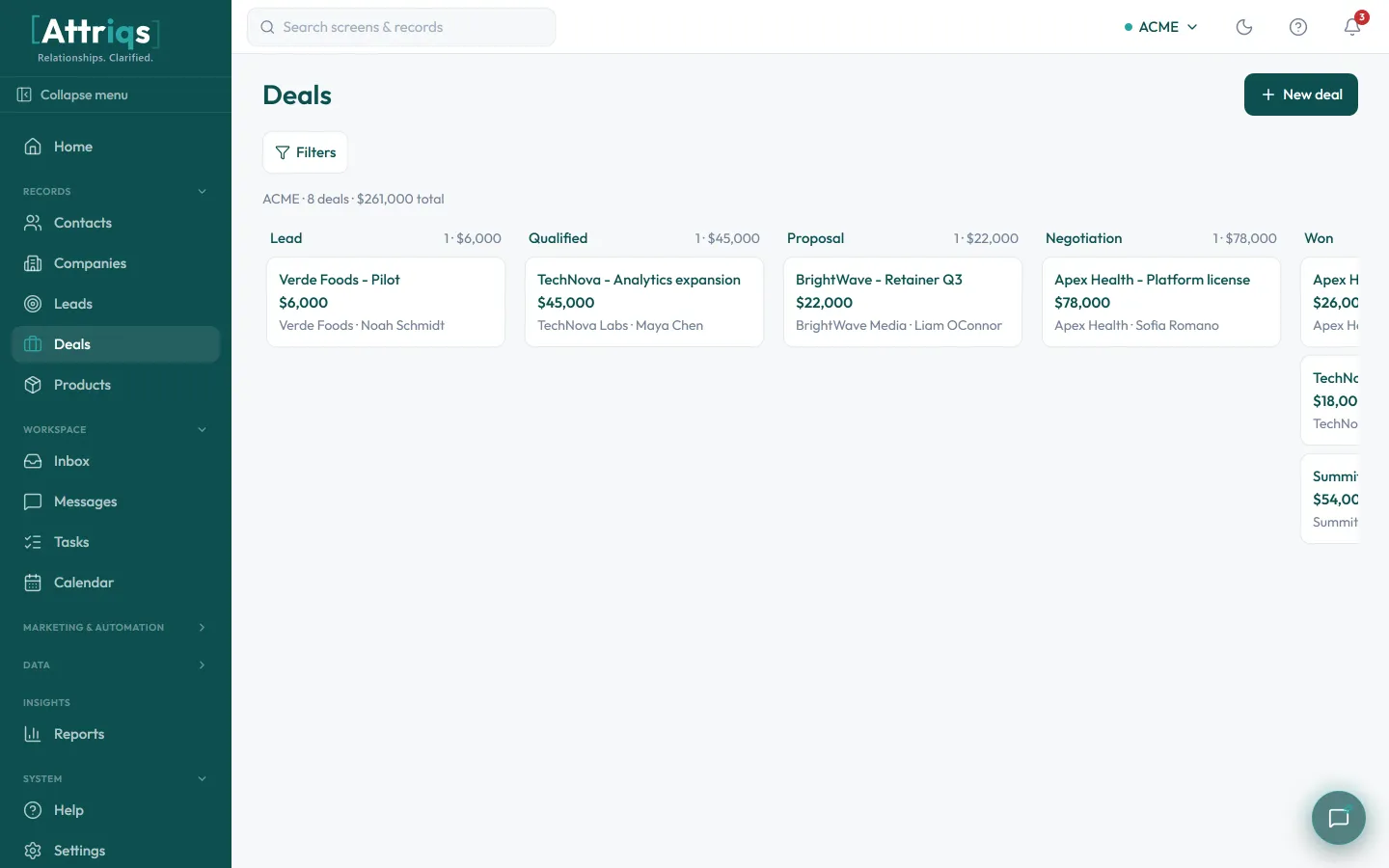
Your pipeline is a visual, drag-and-drop board where every open deal is a card in its current stage. Switch the same deals to a sortable table, run a separate pipeline for each way you sell, and let MosAIc shape your stages to match how you already work.
- Drag deals across stages on a board, or work them in a sortable table
- Run multiple pipelines, each with the exact stages you name and reorder
- Every card shows deal value, owner, and close date at a glance
- MosAIc shapes a starting pipeline around how you already sell
Everything about a deal in one place
Open a deal and you see the whole picture: its value, owner, stage, and close date, the contacts and company attached, and a complete activity timeline that logs itself as you work, so the record stays trustworthy without manual entry.
Find the right deals and act in bulk
Slice your pipeline with an advanced filter builder, save any filter as a reusable View, and act on everything at once. MosAIc points you at the next move on each deal, and your reports show what is actually moving.
Want the playbook on the concept itself? Read our guide to sales pipeline management.
Frequently asked questions
How do pipelines work in Attriqs CRM?
Each deal is a card on a drag-and-drop board, sitting in its current stage; drag it forward to advance it. You can switch the same deals to a sortable table, and run more than one pipeline if different parts of your business sell differently.
Can I use my own sales stages?
Yes. You define and name your own stages, reorder them whenever your process changes, and run a separate pipeline per sales motion. When you start, MosAIc shapes a pipeline around how you already sell so you are not facing a blank board.
Does activity log automatically?
Yes. Emails, calls, notes, and tasks attach themselves to the right deal and contact, so the timeline stays complete without manual entry. That is the main reason the CRM stays in daily use instead of being abandoned.
What does MosAIc do on a deal?
MosAIc surfaces the next best action on each deal, then drafts the email or sets the task so you can act immediately. It works the same on every deal, with no setup.
Can I update lots of deals at once?
Yes. Build an advanced filter, save it as a View, and apply bulk actions to everything that matches: reassign owners, change stage, tag, export, or enroll in a sequence.
Is Attriqs CRM available now?
Attriqs CRM is in early access. Get in touch and we will bring your deals across, let MosAIc shape your pipeline, and show you how it works for your team.
See it on your own data
Attriqs CRM is in early access. Request access or book a quick walkthrough, and MosAIc will help you get set up.